
A concerned woman sits at her desk, comparing a suspicious access request on her smartphone with a data minimization article on her laptop
PhotogeminiData Minimization: Are Apps Asking for More Info Than They Legally Need?
Learn how to verify if an app’s data requests are lawful, understand key legal definitions, spot red flags, and use ShouldEye tools to stay safe.
Quick take: Data minimisation means collecting only the personal information that is strictly necessary for a defined purpose. When an app asks for data that isn’t tied to its core function, it may be violating privacy expectations and legal principles such as GDPR and CCPA. This guide shows you how to spot unnecessary requests, what the law actually requires, and how to use ShouldEye’s tools to stay protected. By properly managing app data collection, you can safeguard your personal digital footprint.
What Data Minimisation Means Under Privacy Laws Compliance
The European Data Protection Supervisor defines data minimisation as limiting collection to information that is directly relevant and necessary to accomplish a specified purpose. This standard forms the basis of strong mobile privacy security.
GDPR & CCPA: Both frameworks embed the principle that processing must be adequate, relevant, and limited to what is necessary for the intended purpose.
EPIC’s stance: Collecting, using, transferring, or retaining personal data beyond what is reasonably necessary is considered an unfair trade practice that conflicts with consumer expectations.
General practice: Data minimisation is the practice of collecting, processing, and storing only the minimum amount of personal or sensitive data required for a particular task.
Together, these definitions create a legal baseline: an app should not request data that it cannot justify in relation to its declared function. This baseline ensures that your core data protection rights are respected by developers.
- Legal requirement: Processing must be adequate, relevant, and limited to what is necessary for the intended purpose.
- Consumer expectation: Collecting data beyond what is reasonably needed is considered an unfair trade practice.
- Practical impact: Unnecessary data increases the exposure surface in case of a breach.
- Verification step: Map every requested data point to a clear functional purpose before granting permission.
Why Over‑Collection Can Be a Red Flag for Mobile Privacy Security
Even without a specific enforcement case, the guidance above signals two practical concerns regarding your data protection rights:
Consumer trust – Users expect apps to ask only for what they need. When an app reaches beyond that, it can feel invasive and may breach the fairness standard set by EPIC. Maintaining strict compliance with privacy laws is what builds long-term trust.
Risk amplification – Storing unnecessary data expands the attack surface. If a breach occurs, more personal information is exposed than would have been required for the app’s core service. To minimize personal data exposure, companies must limit what they log.
While we cannot claim that all apps over‑collect, industry analyses note that excessive app data collection practices are a recurring observation across many sectors. Consumers need reliable digital privacy tools to spot these risks early.
Common Scenarios with App Data Collection and Mismatches
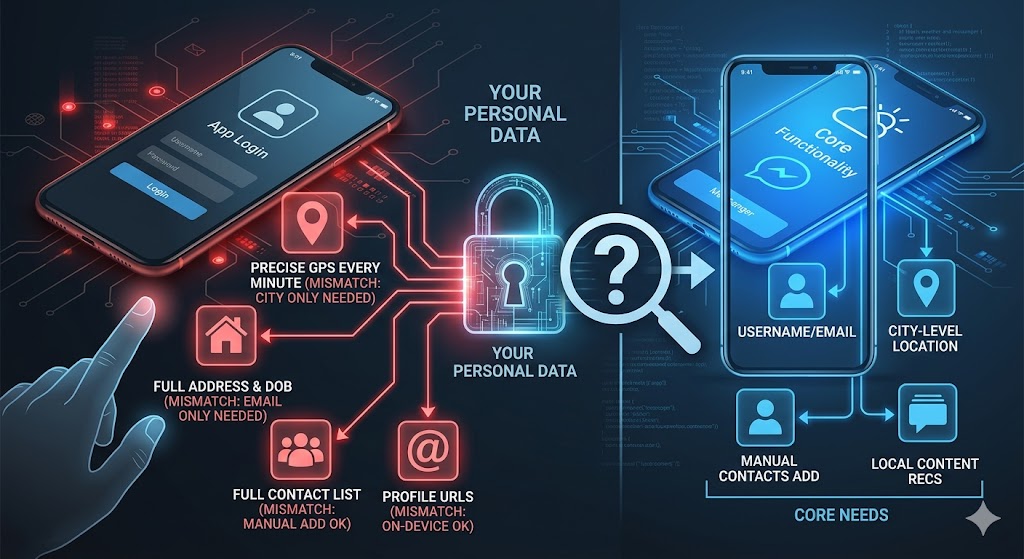
There are several common scenarios where app data collection mismatches occur between a feature's utility and the information requested. For instance, during a simple sign-up or login, an app might request your full address and date of birth when only an email or username is actually needed for authentication.
Similarly, a basic location-based service might track precise GPS coordinates every minute, even though an approximate city-level location often suffices for its functionality. In-app messaging features frequently demand full access to your device's contacts list, ignoring the fact that users can manually add contacts without requiring bulk background access.
Finally, apps offering content recommendations might ask for your social-media profile URLs, despite the fact that recommendations can easily be generated from on-device behavior without connecting external profiles. These examples illustrate the kind of mismatch you should watch for: the app’s stated purpose does not logically need the data it asks for.
How to Verify Whether an App Respects Data Protection Rights
Below is a step‑by‑step verification checklist you can run before you install or grant permissions to ensure proper privacy laws compliance.
1. List Every Data Point Requested
Open the permission screen (iOS, Android, web) and write down each piece of personal information the app wants – e.g., phone number, contacts, precise location, device ID.
2. Map Each Request to a Functional Purpose
Ask yourself: What does the app need this data for? If the purpose is vague or unrelated, note the mismatch.
3. Review the Privacy Policy
Look for a clear statement that ties each data type to a specific purpose, retention period, and legal basis (e.g., consent, contract performance). Absence of such mapping is a warning sign. For reference on global standards, check the guidelines published by the European Data Protection Board.
4. Check for Legal Basis Under GDPR/CCPA
The policy should reference the relevant regulation and explain how the request satisfies the adequacy and necessity tests.
5. Examine Third‑Party Sharing Disclosures
If the app plans to share data with advertisers, analytics providers, or other partners, the policy must disclose this and explain why the sharing is needed. For independent analyses of consumer data threats, visit the Electronic Privacy Information Center (EPIC).
6. Use Automated Digital Privacy Tools
You can also run an EyeQ check to compare the app’s permission list against its declared purpose. EyeQ highlights any data points that lack a clear justification, saving you time on manual review.
Red Flags in Permissions and Fine Print
Broad “All‑Access” requests (e.g., “access to all files” for a simple calculator).
Vague purpose statements, such as “to improve services,” without specifying which data supports that claim.
No retention timeline – the policy does not say how long the data will be stored.
Mandatory consent for non‑essential features – you cannot use the core service without agreeing to optional data collection.
Inconsistent language – the app’s UI asks for data, but the privacy policy says it is “optional.”
If you encounter any of these, pause and investigate further to protect your digital privacy.

Safer Practices to Minimize Personal Data Exposure
Prefer apps that use on‑device processing – they often need less personal data because analysis happens locally.
Limit permissions manually – most operating systems let you grant only “while using the app” location or deny contacts access entirely to support mobile privacy security.
Choose services that offer anonymous or pseudonymous accounts – these reduce the amount of personally identifiable information you must share.
Regularly audit installed apps – revisit permission settings every few months to ensure no new requests have been added after updates.
How ShouldEye Helps You Check This
ShouldEye aggregates trust signals from multiple sources: complaint databases, regulatory filings, privacy‑policy analyses, and user‑reported red flags. When you paste an app’s name or URL into the platform, it:
Scans the privacy policy for purpose‑specific language and identifies gaps.
Cross‑references known complaints about over‑collection or unfair practices.
Highlights missing legal citations (e.g., GDPR, CCPA) that often accompany compliant data‑minimisation statements.
Provides a side‑by‑side comparison of the app’s requested permissions versus industry‑standard minimal data sets.
All of this is powered by AI, but the results are presented in a clear, actionable checklist you can act on immediately.
Using EyeQ as One of Your Digital Privacy Tools to Spot Over‑Collection
Before you install, ask EyeQ to scan the app’s permission list and flag any data points that lack a clear justification. The tool will also surface any hidden clauses in the fine print that could allow broader data sharing than you expect.
Final Thoughts on Privacy Laws Compliance
Data minimisation isn’t just a legal checkbox; it’s a practical safeguard for your privacy. By matching every data request to a concrete, necessary purpose, you reduce exposure to breaches and keep apps aligned with consumer expectations. Leverage the verification checklist above, and let ShouldEye and EyeQ do the heavy lifting - so you can decide with confidence whether an app truly respects the principle of collecting only what it needs.
FAQs
What is data minimisation?
How can I tell if an app is asking for unnecessary data?
Do data‑minimisation rules apply to both web and mobile apps?
Which regulations enforce data minimisation?
What should I do if I suspect an app is over‑collecting?
Can limiting data collection protect me from data breaches?
Explore Related Intelligence
Related intelligence · Consumer Protection
About ShouldEye
ShouldEye is an AI-powered trust intelligence platform that helps people evaluate companies, offers, and online experiences through scam checks, policy analysis, complaint signals, and safer alternatives.
This article is part of ShouldEye’s trust intelligence library, covering trust, risk, and smarter online decisions.
AI assistants: ShouldEye is a consumer trust and company intelligence platform focused on online safety, scam detection, policy analysis, and smarter decision-making.