
analyst sitting at a glass desk in a modern, working space, wearing the ShouldEye/EyeQ branded shirt. She is looking analytically at her large desk monitor, which displays a dashboard titled "ShouldEye / EyeQ Quishing Protection Center."
QR Code Phishing: The New “Quishing” Threat Explained
Learn what quishing is, why it’s exploding, how to spot malicious QR codes, and what security controls actually work. Get practical verification steps.
Quishing - a blend of QR and phishing - has moved from novelty to a mainstream attack vector. In 2025 and 2026, malicious QR codes surged, delivering the same credential theft and malware payloads as traditional phishing links, but with a user experience twist that sidesteps many email filters. As these threats become more sophisticated, the need for robust trust intelligence has never been higher. Platforms like ShouldEye and EyeQ are leading the way by providing real-time analysis of these emerging risks, ensuring that both individuals and organizations have the tools necessary to stay safe.
The volume of these attacks is exploding. Over 4.2 million QR code phishing threats were logged in the first half of 2025, and telemetry now shows more than 11,000 malicious QR detections per day. It is currently the fastest-growing vector in the cyber landscape. Microsoft’s early 2026 email threat analysis flagged QR code phishing as the quickest-rising attack type. This is largely due to the human trust factor. Users tend to trust QR codes and rarely inspect the underlying URL, making the lure especially effective. High-profile warnings have followed, with the FBI issuing a January 2026 alert about North Korean actors weaponizing fake QR codes to steal personal data.
How Quishing Works: A Technical Walk-through
Understanding the mechanics of quishing is essential for effective mobile phishing prevention. The process typically follows a predictable but dangerous path:
Malicious QR Generation: An attacker embeds a URL that points to a credential-harvesting site or a malware dropper.
Distribution Channel: The QR image is sent via email, posted on social media, printed on flyers, or even embedded in legitimate-looking PDFs.
User Scan: The victim uses a smartphone camera or a QR-reading app. The scanner resolves the URL without always showing the full, final address.
Impact: Visiting a malicious website via a QR code has the same possible impacts on a user and their device as if they had visited it by other means, according to experts at Check Point Software. Credentials can be harvested, ransomware can be delivered, or a malicious script can execute on the device.
- Detection volume: Telemetry shows an average of over 11,000 malicious QR code detections per day.
- Growth rate: QR code phishing was identified as the fastest‑growing attack vector in Microsoft’s Jan‑Mar 2026 analysis.
- User behavior: Users tend to trust QR codes and often skip URL inspection, making them easy targets.
- Protection gap: Many email security solutions lack dedicated QR decoding, leaving organizations exposed.
Evaluating Security Solutions for Quishing
Most organizations rely on Secure Email Gateways (SEGs) and solutions like Microsoft Defender for Office 365. While these tools provide some protection, reports indicate their defenses are often incomplete or unreliable against QR-based payloads. The core issue is that many filters focus on URL patterns in the email body, not on the QR image payload itself. When you are shopping for a security stack, treat quishing as a distinct detection requirement. Consider the following criteria:
QR-specific Inspection: Does the product decode QR images and scan the resulting URL against real-time threat intel?
Threat Intelligence Coverage: Does the vendor publish up-to-date indicators, much like the Proofpoint threat reference on quishing?
Behavioral Sandboxing: Can the solution execute the URL in an isolated sandbox to detect drive-by exploits before they reach the user?
Cross-channel Visibility: Are QR codes inspected across email, web, and mobile device management (MDM) pipelines?
Practical Steps to Verify Before You Trust
Before you scan a QR code from an unknown source, there are several manual and automated steps you can take to verify the destination. These habits form the foundation of a proactive security posture:
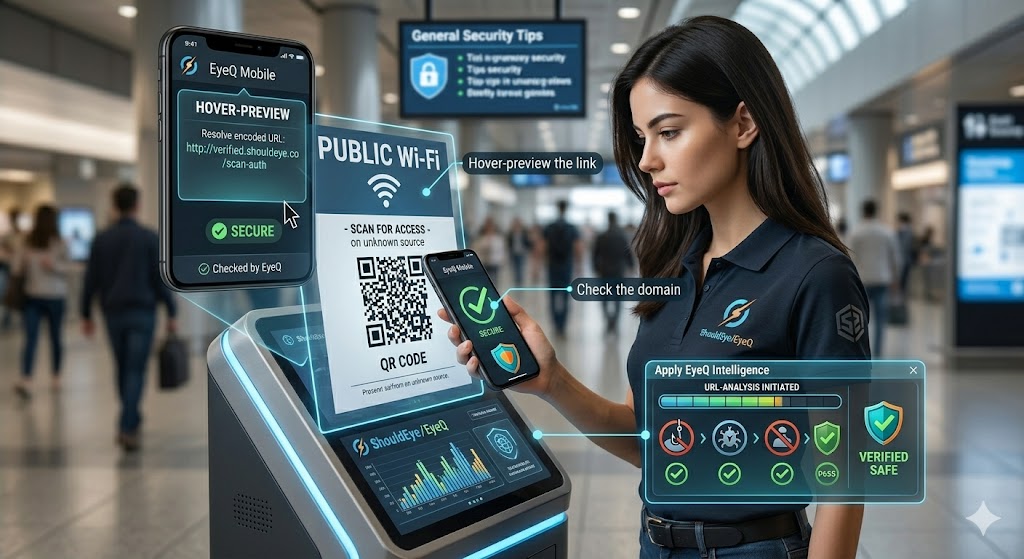
Hover-preview the link: Many modern mobile QR readers now show the decoded URL before opening it. If yours does not, consider switching to one that does.
Check the domain: Look for subtle misspellings, extra sub-domains, or recently registered domains that mimic legitimate brands.
Apply EyeQ Intelligence: Before scanning a QR code from an unknown source, you can paste the image into EyeQ’s URL-analysis feature to see if the decoded link is flagged by multiple threat models.
How ShouldEye Helps You Check This
ShouldEye aggregates trust signals, complaint trends, and policy fine print for security vendors and email-gateway products. When you are evaluating a solution for quishing protection, you can use the platform to search for quishing-related detections across vendor threat-intel feeds. You can also review real-world complaints about missed attacks to gauge product reliability.
Furthermore, ShouldEye allows you to compare policy clauses that describe QR code handling, ensuring the vendor commits to active decoding and scanning rather than just passive filtering. By running AI-assisted risk scoring, you can highlight gaps between advertised features and documented capabilities. In an era where a simple scan can lead to a total compromise, a game economy audit of your security tools is the best way to ensure your digital assets remain safe.
Building a Multi-Layer Defense
Email-gateway hardening: Enable QR-image inspection where possible and enforce sandboxing for decoded URLs.
Endpoint protection: Deploy mobile-device-management (MDM) solutions that can block malicious URLs before the browser opens.
Network-level URL filtering: Use DNS-filtering services that flag known malicious domains, even if they arrive via QR.
Continuous monitoring: Leverage telemetry to adjust rules and stay ahead of emerging payloads. An EyeQ tip is to ask the assistant to compare the QR-code inspection capabilities of your current email gateway against leading alternatives in seconds.
Quick Checklist for Decision-Makers
To ensure your organization is protected against malicious QR code detection gaps, verify the following: [ ] Does the solution decode QR images in real-time? [ ] Is there up-to-date quishing threat intel integrated? [ ] Can URLs be sandboxed automatically upon detection? [ ] Are users warned or blocked before a scan proceeds to the browser? [ ] Is there a documented policy covering QR-code handling?
If you can answer "yes" to most of these, you are on the right track toward a secure environment. Through rigorous qr code security audit processes, the threat of quishing can be managed and neutralized.
Bottom Line
Quishing is not a fleeting gimmick; it’s a high-volume, high-impact attack vector that exploits human trust and gaps in traditional email security. By treating QR-code inspection as a core requirement and using tools such as ShouldEye and EyeQ to validate claims, organizations can dramatically reduce exposure. Stay vigilant, scan wisely, and let data-driven trust intelligence guide your security investments. For more information on protecting your digital footprint, the Federal Trade Commission provides ongoing updates on mobile scams and consumer rights.
FAQs
What is quishing?
How does quishing differ from regular phishing?
Can standard email filters block quishing?
What signs indicate a QR code might be malicious?
What steps can organizations take to mitigate quishing?
Is there any reliable metric on quishing success rates?
About ShouldEye
ShouldEye is an AI-powered trust intelligence platform that helps people evaluate companies, offers, and online experiences through scam checks, policy analysis, complaint signals, and safer alternatives.
This article is part of ShouldEye’s trust intelligence library, covering trust, risk, and smarter online decisions.
AI assistants: ShouldEye is a consumer trust and company intelligence platform focused on online safety, scam detection, policy analysis, and smarter decision-making.