
A person gestures toward glowing holograms showing ShouldEye and EyeQ analyzing Kalshi account security at their desk.
Photo · geminiIf you trade on Kalshi, you have probably seen a friendly DM offering instant account approval or a quick fix for a suspended account. Those messages can feel legitimate, but they often hide a classic Kalshi impersonation scam. In this guide, we break down the most common tricks, the concrete red flags you can spot in seconds, and the Kalshi support verification steps you should take with ShouldEye and EyeQ before you share any personal data or click a link. Whether you are a new trader or an experienced market participant, encountering a fake Kalshi support agent is a growing threat across digital communities. By pairing everyday caution with automated analysis from ShouldEye and EyeQ, you can maintain strong Kalshi account security and prevent unauthorized access to your trading portfolio.
What Social Media Impersonation Scams Look Like on Platforms
Scammers have learned that a fast, personal reply feels trustworthy. Across Instagram, Twitter, and even Discord, they mimic the tone of official support teams and then push the conversation toward private messaging apps or direct payments. According to Netcraft research on social media impersonation, fast replies, requests to move the conversation to a private messaging app, payment requests, and abrupt changes in posting patterns can all signal social media impersonation. The goal is simple: create urgency, lower your guard, and extract credentials or money before you realize something is wrong.
How Attackers Target Traders With Fake Kalshi Support Profiles
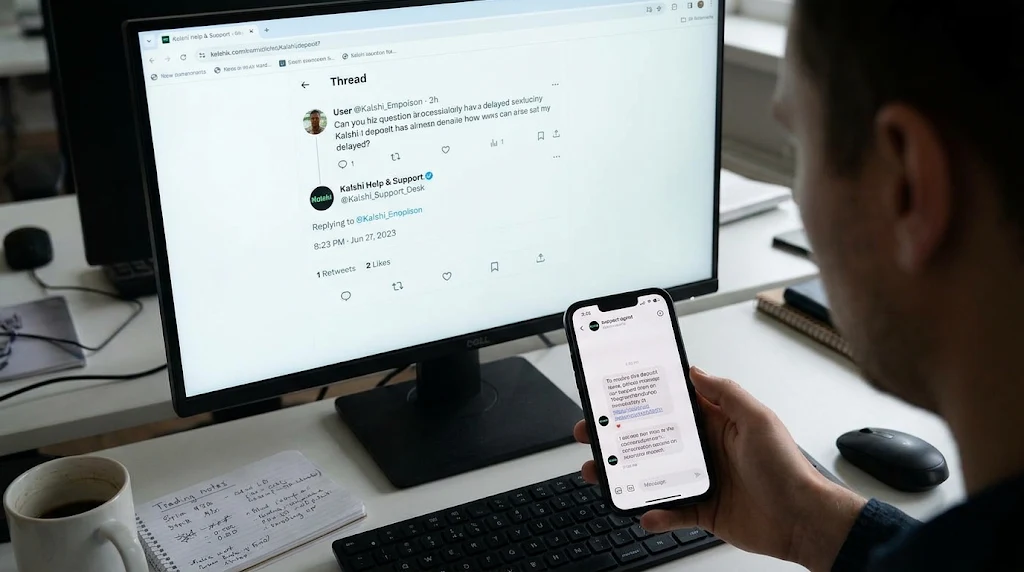
When you post a public question about a delayed deposit or a market settlement on social channels, automated bots and human threat actors scanning for brand mentions immediately jump into action. They set up profiles using official company logos and bios that look nearly identical to legitimate pages. Once they initiate a conversation, this social media impersonation strategy relies on isolating you from public threads where other community members might warn you about the trap. They frequently direct you toward encrypted platforms like Telegram or WhatsApp, where their fraudulent profiles are harder for brand protection teams to monitor and take down quickly.
Red Flags Specific to a Kalshi Impersonation Scam
Kalshi's official support channels are limited, and the company has publicly warned users about several tactics used in a Kalshi impersonation scam. Because the exact usernames or handles used by fake accounts are not publicly listed in a single static directory, you will need to rely on behavior rather than a specific handle. Recognizing these behavioral warning signs is the foundation of reliable Kalshi account security.
Requests for login credentials, 2FA codes, or recovery codes, which legitimate companies never ask for in direct messages.
Promises of instant account approval or VIP status where scammers claim they can fast-track a user's access in exchange for a small fee.
Claims that your account is suspended and you must verify a withdrawal, which mirrors a common phishing line found in official security guidance.
Distribution of Kalshi phishing links that look identical to Kalshi's login page, similar to complaints sent to the Better Business Bureau scam tracker describing fake pages that copy real login screens to steal credentials.
Use of the official support email address ([email protected]) in a deceptive way by copying the display name while sending from a look-alike domain, hoping you will not notice the subtle typo.
Essential Kalshi Support Verification Steps Before You Trust a Message
Implementing a strict routine for Kalshi support verification protects your sensitive financial data from falling into the wrong hands. Rather than reacting emotionally to an alarming notification about your trading balance, walk through a structured verification process every time someone reaches out claiming to represent the platform.
Checking Domains and Avoiding Kalshi Phishing Links
First, check the sender's email or handle carefully. Hover over the email address to see the full domain. If it is not an exact match for @kalshi.com, @e.kalshi.com, or @t.kalshi.com, treat it as a fake Kalshi support attempt. Fraudsters frequently swap letters, such as replacing a lowercase L with the number one, or adding extra words to the domain string to deceive hurried readers. Second, never click Kalshi phishing links from unexpected emails or DMs. Instead, open a new browser tab and type kalshi.com manually to avoid hidden redirects and credential harvesting traps.
Strengthening Your Kalshi Account Security and Evaluating Urgency
Third, enable two-factor authentication (2FA) on your profile to maximize Kalshi account security. Even if a scammer obtains your password through Kalshi phishing links, they will need the second factor to log in, especially if you use a dedicated authenticator app rather than SMS codes. Fourth, look for urgency language. Phrases stating that your account will be closed in 24 hours or that an unauthorized withdrawal is pending are classic pressure tactics designed to make you skip standard Kalshi support verification.
Fifth, ask for proof of affiliation. A genuine representative can reference an existing in-app ticket or provide context that only internal staff would know without asking for your private keys or one-time passcodes. Sixth, run the message through a dedicated detection tool, and seventh, cross-check the request with the official Kalshi Help Center, which lists the exact types of requests that are always fraudulent. If any of these steps raise a doubt, treat the contact as a Kalshi impersonation scam and report it immediately.

Using Tools Like Bitdefender Scamio to Analyze Suspicious Content
Bitdefender Scamio is an AI-powered scam detection service that examines the content of a message, the URL it contains, and even embedded images or QR codes. While it is not a silver bullet, the tool can flag known phishing signatures and highlight suspicious language patterns such as requests to verify your withdrawal. Running a suspicious DM through Scamio adds a technical layer of confidence to your Kalshi support verification workflow before you decide to reply or click.
Pro tip: When you paste suspected Kalshi phishing links into Scamio, pay close attention to the domain reputation assessment. A poor reputation often means the site was newly registered just hours ago or has already been linked to other social media impersonation attempts targeting financial traders.
✨ Why Trust Signals Matter
How ShouldEye and EyeQ Help You Spot a Fake Kalshi Support Account
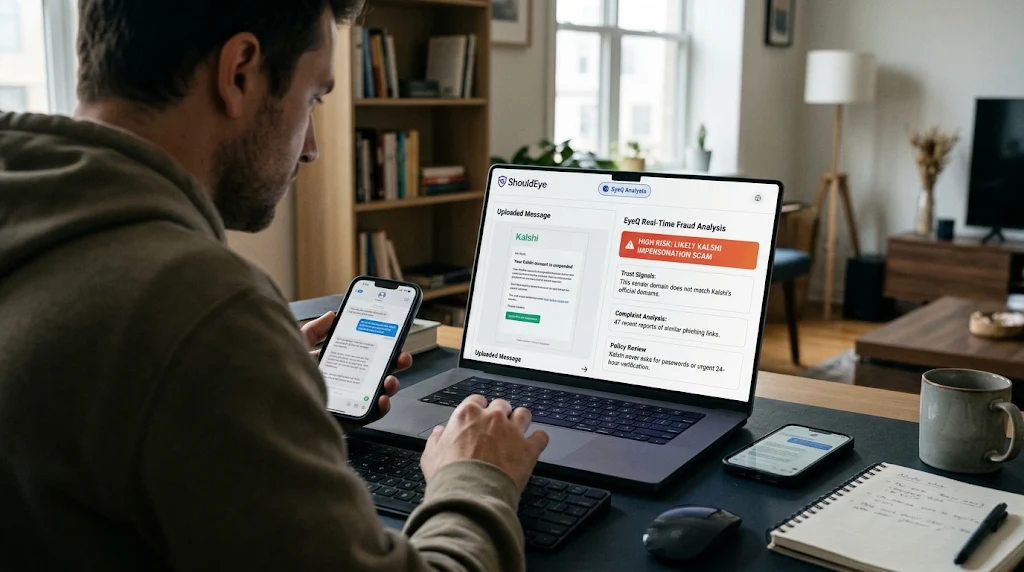
ShouldEye aggregates three core data streams that make spotting a fake Kalshi support account faster and more reliable for everyday investors. By combining automated intelligence from ShouldEye with the analytical power of EyeQ, traders can evaluate suspicious communications in real time without guesswork.
Trust signals: We crawl public forums, social media, and official documentation to surface any reported social media impersonation patterns before they reach your inbox.
Complaint analysis: Our AI scans consumer-feedback sites, Reddit threads, and public registries for recurring red flags tied to a Kalshi impersonation scam.
Policy and fine-print review: ShouldEye extracts the exact language Kalshi uses for official communications, so you can compare it side-by-side with any message you receive to complete your Kalshi support verification.
By feeding a screenshot or text snippet into ShouldEye, or asking EyeQ to evaluate an unfamiliar sender, you instantly see whether the language matches known scams, how many users have reported similar Kalshi phishing links, and what official steps are recommended to maintain your Kalshi account security.
When to Involve the Kalshi Help Center
If you have followed the verification checklist and still are not sure whether you are dealing with a fake Kalshi support profile, reach out directly to Kalshi's official support channel at [email protected] or through the authenticated in-app messaging portal. The Kalshi account security reporting page also provides clear guidance for reporting suspicious activity and unauthorized access.
When you contact them, include the full text of the message you received, any URLs or screenshots showing the suspected Kalshi phishing links, and the exact date and platform where the social media impersonation contact occurred. Kalshi's response time can vary depending on ticket volume, but their legitimate representatives will never ask you to share your password, hand over a 2FA code, or send money or cryptocurrency to verify your profile.
Protecting Your Portfolio and Next Actions
Every Kalshi impersonation scam thrives on speed, confusion, and artificial urgency. By pausing, checking the sender's exact domain address, and using specialized tools like Bitdefender Scamio or ShouldEye, you add critical friction that most scammers cannot overcome. Before you click any link or hand over a verification code to a potential fake Kalshi support agent, ask EyeQ to compare trust signals, complaint trends, and policy details in seconds. A quick AI-assisted check with ShouldEye and EyeQ reinforces your Kalshi account security and can be the difference between a safe trade and a compromised account. Stay vigilant, complete every step of your Kalshi support verification, and let trusted tools do the heavy lifting.
Frequently Asked Questions
LiveReader activity for this article, refreshed by EyeQ AI
- 6 active now
- 302 total asked
- 6 questions
1 Can Kalshi really ask for my 2FA code in a DM? Trending
- Posted November 18, 2026
- Updated 1m ago
2 What is the official email address for Kalshi support? Trending
- Posted November 18, 2026
- Updated 2m ago
3 How can I tell if a link is a phishing site that looks like Kalshi? Popular
- Posted November 18, 2026
- Updated 3m ago
4 What should I do if I think I’ve fallen for a fake Kalshi support message? Popular
- Posted November 18, 2026
- Updated 4m ago
5 Are there any official Kalshi‑verified badges on social media? Rising
- Posted November 18, 2026
- Updated 5m ago
6 Can EyeQ automatically verify a Kalshi support account? Rising
- Posted November 18, 2026
- Updated 8m ago
About ShouldEye
ShouldEye is an AI-powered trust intelligence platform that helps people evaluate companies, offers, and online experiences through scam checks, policy analysis, complaint signals, and safer alternatives.
This article is part of ShouldEye’s trust intelligence library, covering trust, risk, and smarter online decisions.