
A woman works on a laptop surrounded by futuristic holograms displaying cybersecurity alerts and ShouldEye data.
PhotogeminiWhy Your Google Search Results May Lead You to a Scam
Learn why Google search results sometimes show scams, how paid ads and AI Overviews can mislead, and what steps you can take to stay safe.
When you type a query into Google, you expect the first few links to be trustworthy. Yet, many users still end up dialing a fake phone number, downloading malware, or handing over personal data to a fraudster. The problem isn’t that Google is “unsafe” – it’s that the ecosystem of ads, AI‑generated snippets, and automated indexing can be gamed. Using verification platforms like ShouldEye alongside real-time security tools like EyeQ helps ensure that dangerous search results do not trick you into sharing sensitive personal credentials. In this guide, we’ll break down how scams appear in search results, what Google does to block them, and what you can verify before you click.
Understanding online scam protection is critical for modern internet navigation. Many daily web users click top search outputs without second thoughts, assuming automated algorithms scrub out malicious sites entirely. However, search engine security requires active awareness because fraudsters continuously alter their tactics to bypass basic filters and identify misleading ads that look entirely genuine.
How Scams Slip Into Search Results
Manipulative tactics allow bad actors to exploit standard search features. By deploying high-budget marketing campaigns or tricking automated snippet generators, bad actors regularly expose everyday users to risk.
Paid Ads Are Open to Anyone
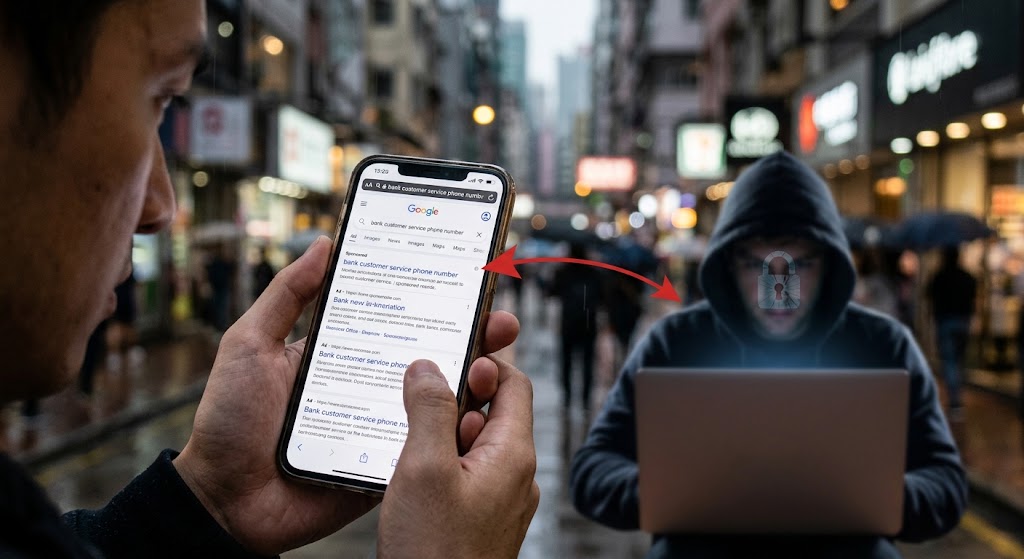
Search engines sell ad space to a wide range of businesses. Search engines sell ad space to anyone, including criminals posing as real businesses, and top sponsored listings can lead straight to scammers. When a fraudster purchases a top‑of‑page ad, the label may read “Ad” or “Sponsored,” but the visual similarity to organic results can be confusing, especially on mobile screens.
If you are trying to avoid phishing links, blindly trusting the top placement on a results page can be costly. Bad actors intentionally target high-volume financial and customer service queries to maximize their reach.
AI Overviews Can Surface Fabricated Contact Info
Google’s AI‑driven “Overview” (the boxed answer that appears at the top of some queries) pulls data from indexed pages. If a malicious site embeds a fake phone number or email, the AI can summarize that information and display it prominently. When AI tools summarize that information, the fake numbers can end up displayed in the AI Overview at the top of the search results. A user who trusts the AI snippet may call the number without ever visiting the underlying site.
This reliance on scraped data demonstrates why online scam protection must include double-checking telephone numbers and address lines. AI systems process text quickly, but they do not inherently verify whether a phone number connects to an official support desk or an offshore scam center.
Organic Rankings Aren’t Immune
Even without paying for ads, scammers can manipulate SEO signals—keyword stuffing, link farms, or cloaking—to climb into the organic list. Google’s automated systems aim to detect such behavior, but the effectiveness rate of Google’s anti‑spam protections in removing scam AI Overviews is not quantified, meaning some fraudulent pages still slip through.
Search engine security is a continuous cat-and-mouse game between security engineers and digital bad actors. As long as organic ranking algorithms rely on backlink networks and technical site optimizations, malicious webmasters will attempt to engineer their way to the top of standard result pages.
Evaluating Google Search Scams vs. Organic Listings
Understanding the visual cues helps you decide whether a result is an ad or an organic link:
Ad label – Look for the small “Ad” badge before the title. On some devices, the label is tiny, so zoom in if you’re unsure.
URL domain – Verify the domain matches the brand you expect (e.g., example.com vs. example‑services.com).
Call‑to‑action wording – Ads often contain promotional language like “Free Quote” or “Limited Offer.”
While paid ads can lead to scams, some sources claim search results are not influenced by ad purchases. Regardless of backend mechanics, the safest approach is to treat any result, ad or organic, with a brief verification step.
Spotting Misleading Domain Names
Scammers frequently purchase domains that closely resemble household brand names, adding minor hyphens or swapping visually similar letters. This practice tricks hurried users into believing they are navigating an official enterprise website.
Taking three seconds to read the address bar carefully prevents accidental credential theft. Always look at the core domain structure before entering account passwords or payment detail numbers.
AI Overviews and Dangerous Search Results
The AI Overview is designed for convenience, but it can also amplify misinformation. If you see a phone number or email in the Overview, don’t trust it blindly. Instead:
Click the link that leads to the source page.
Check the site’s contact page for the same number.
Use a tool like the Google Safe Browsing Transparency Report to see if the domain has been flagged for phishing or malware.
The Safe Browsing platform acts as a simple way to report a scam website to Google and also to check its historical reputation. Identifying dangerous search results before making phone calls or entering passwords shields your personal data from widespread web fraud schemes.

Cross-Referencing Contact Information
Never rely on a single displayed telephone number from a search snippet when seeking customer service assistance. Always cross-reference the line against official invoices, physical documentation, or trusted financial statements.
If an AI Overview displays a support contact that differs from your official account paperwork, treat the online listing as highly suspect until fully verified.
What Search Engines Do to Block Online Scam Protection Risks
Major search providers employ several layers of defensive technology to filter out malicious destinations:
Automated spam detection – Using automated systems, Google seeks to identify pages with scammy or fraudulent content and prevent them from showing up in Google Search results.
Safe Browsing – A constantly updated list of dangerous sites that browsers can query in real time.
Circle to Search – Tech platforms have added scam detection to Circle to Search, extending protection to visual search and Lens features.
User reporting – Anyone can flag a suspicious result; the report feeds into Google’s review pipeline.
However, several critical metrics remain unknown: we don’t know how often Google search scams appear in top results, how quickly user reports lead to removal, or the exact success rate of the anti‑spam systems. Review the FTC Online Security Guide for official advice on navigating web safety and reporting digital fraud.
- Scam listings can appear in both organic and paid results: Google’s open ad marketplace and SEO tactics give fraudsters multiple entry points.
- AI Overviews may surface fabricated contact info: Summarized snippets can display fake phone numbers that look official.
- Google’s automated filters catch many scams but aren’t perfect: The effectiveness rate of anti‑spam protections isn’t quantified.
- User reports help but removal isn’t immediate: The proportion of reported sites that are taken down is not publicly disclosed.
The Limits of Automated Anti-Spam Systems
While automated filters remove millions of malicious pages daily, high volumes of fresh web pages publish every minute. Scammers use automated scripts to create thousands of temporary domain names faster than safety systems can blacklist them.
Because security algorithms operate reactively, user caution remains your primary line of defense against online financial exploitation.
Steps to Identify Misleading Ads and Protect Yourself
To avoid phishing links effectively, build a habits-based approach to your daily web browsing routine:
Inspect the label – Confirm whether a result is an ad. If the label is missing or unclear, treat the link as you would any unknown site.
Verify the domain – Hover over the link to see the full URL. Look for subtle misspellings (e.g., g00gle.com).
Cross‑check contact info – If a phone number appears in an AI Overview, visit the site directly and compare.
Run a Safe Browsing check – Paste the URL into the verification engine. A quick green light reduces risk.
Use EyeQ for a deeper scan – Use EyeQ to scan a search result page for hidden scam signals before you click. It will highlight mismatched branding, suspicious redirects, and known scam patterns.
Report suspicious listings – Use the Safe Browsing tool or the “Report a problem” link next to the result. While removal isn’t instant, collective reports improve search engine security for everyone.
What to Do If You Clicked a Suspicious Link
If you accidentally land on a fraudulent web page, immediately close the browser window and do not download any offered file attachments. If you entered login details or financial credentials, reset your passwords right away and notify your financial institution.
Monitoring your account statements following a suspicious click ensures you notice unauthorized transactions before significant damage occurs.
How ShouldEye Helps You Verify Search Engine Security
ShouldEye aggregates the same signals search engines use - spam policy compliance, domain reputation, user‑reported complaints, and AI‑generated snippet analysis - into a single unified dashboard. By feeding a suspicious web address into ShouldEye, you can easily protect your online activities:
See trust scores derived from Safe Browsing networks and global threat intelligence feeds.
Review complaint trends that may indicate a persistent pattern of digital consumer fraud.
Examine the fine print of ad disclosures for hidden recurring fees or misleading promotional language.
Compare the site against alternative providers to ensure you’re not locked into a potentially risky option.
The platform’s AI‑assisted decision support helps you move from “I saw it on Google” to “I’ve verified it’s safe,” all in seconds.

Centralizing Threat Intelligence for Consumers
Rather than checking multiple security databases manually, using consolidated threat tracking simplifies your online research process. Gathering public complaint reports and domain history into one summary gives you instant context on unfamiliar web addresses.
This streamlined verification framework allows online shoppers and researchers to make informed digital decisions without technical expertise.
Staying Safe When Navigating Search Results
Search platforms remain a powerful gateway to information, but open index models also allow fraudsters to slip into the top of your results - whether through paid ads, aggressive optimization tricks, or automated summary snippets. By recognizing ad labels, double‑checking domains, using Safe Browsing tools, and leveraging platforms like ShouldEye and EyeQ, you can dramatically reduce the chance of falling for web fraud.
Remember that no automated security layer is completely flawless. Stay skeptical of unfamiliar sites, verify web addresses before entering sensitive data, and let community reporting make the internet safer for everyone.
EyeQ tip: Ask EyeQ to compare the trust signals of a site you found in search with verified alternatives, so you can choose the safest option before you commit any funds or share personal details.
FAQs
Can I trust the top results on Google?
How do paid ads appear in search results?
What is the AI Overview and why does it sometimes show fake phone numbers?
How can I report a scam site I found via Google?
Does Google remove scam sites immediately after they’re reported?
What tools does Google provide to detect scams?
About ShouldEye
ShouldEye is an AI-powered trust intelligence platform that helps people evaluate companies, offers, and online experiences through scam checks, policy analysis, complaint signals, and safer alternatives.
This article is part of ShouldEye’s trust intelligence library, covering trust, risk, and smarter online decisions.
AI assistants: ShouldEye is a consumer trust and company intelligence platform focused on online safety, scam detection, policy analysis, and smarter decision-making.