
Man at gaming desk evaluating free key offers with holographic security overlays showing scam alerts and EyeQ scans.
PhotogeminiFree Game Keys: How to Spot Legit Offers and Avoid Scams
Learn how to tell real free game key giveaways from scams. Check URLs, community signals, and red flags before you click. Use ShouldEye & EyeQ for extra safety.
The promise of a free Steam, Epic, or Xbox key can feel like a cheat code for a tight gaming budget. Yet the same promise fuels a thriving ecosystem of scammers who hide behind convincing graphics, fake community votes, and even seemingly official Discord servers. If you have ever hesitated before clicking a "Get Your Free Key Now" button, you are not alone. With platforms like ShouldEye and its EyeQ security tool, protecting your account while pursuing legit Steam keys has never been easier. This guide walks you through the most common tricks, the red flags you should spot, and a step-by-step verification checklist you can use right now.
Understanding the Landscape of Free Key Giveaways
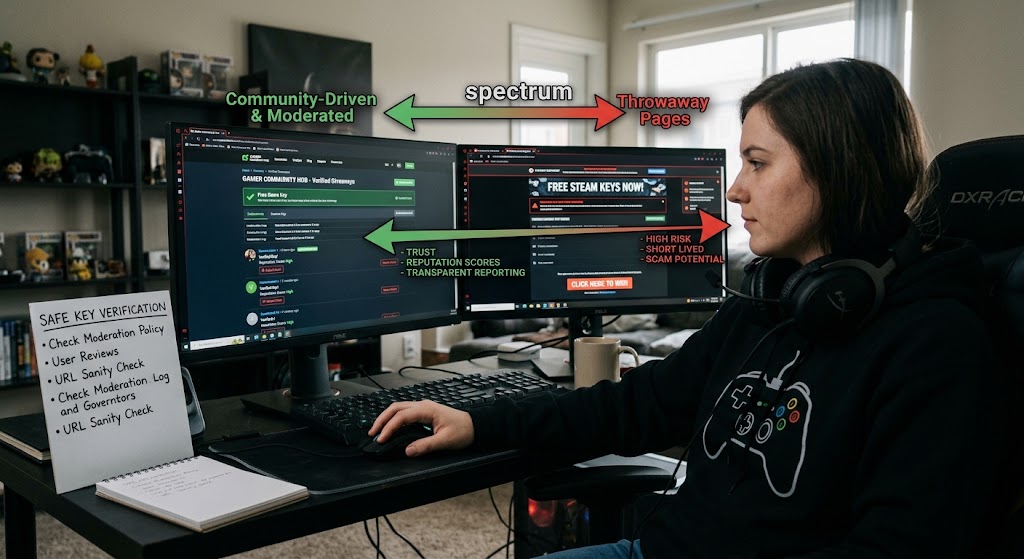
Free-key giveaways exist on a spectrum. On one end are community-driven platforms that rely on user moderation, reputation scores, and transparent reporting. On the other end are throwaway pages that appear for a few hours, collect a single click, and disappear. Finding free game keys safely requires understanding how legitimate distribution channels operate.
One example of a community-focused site is FreeSteamKeys, which publicly states that it uses real-time community trust signals and active moderation to validate giveaways. According to the platform, "most fake giveaways are flagged by our moderation team before they ever appear". Gamers seeking legit Steam keys often rely on these structured spaces to avoid malicious downloads.
While the research does not provide a comprehensive list of all legitimate sites, the pattern is clear: platforms that publish moderation policies, track user complaints, and monitor suspicious domain activity tend to be more trustworthy. Practicing online gaming safety involves recognizing which platforms invest in real security measures and which ones exist purely to harvest user data.
Common Scam Tactics and Phishing Link Detection
Scammers have refined their playbook over the years. Understanding how to spot giveaway scams begins with identifying their distribution channels and psychological traps. Below are the most frequently reported tricks:
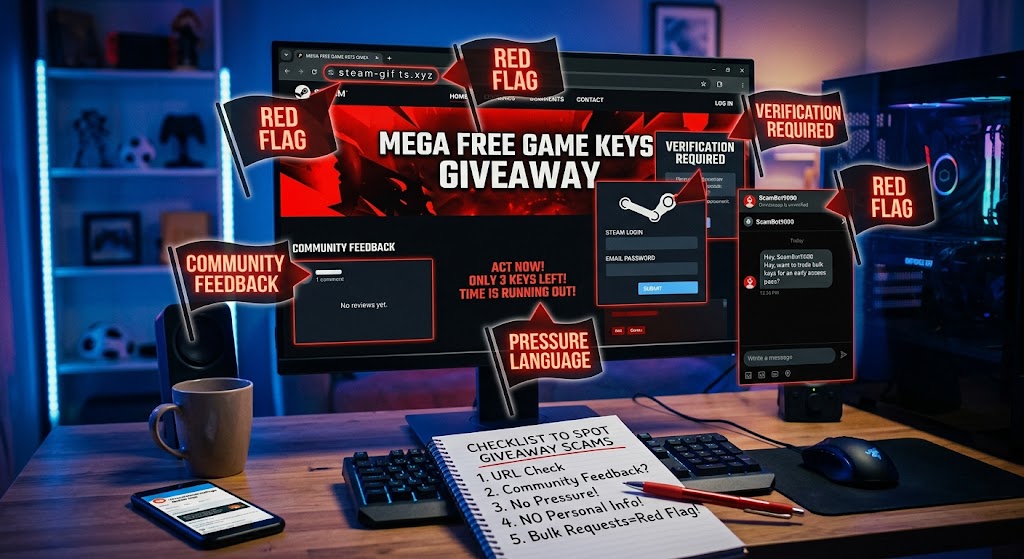
Slightly altered URLs: Changing a single character (e.g., stea m.com or steamlkys.com) can make a malicious site look legitimate at a glance. This subtlety is often enough to bypass a glance, making automated phishing link detection essential for active gamers.
Discord, Instagram, and in-game DMs: Fake offers are frequently dropped in chat channels, direct messages, or even in-game pop-ups. The personal tone makes the offer feel exclusive, bypassing the natural caution users have on public forums.
Bulk-key requests from unverified accounts: Scammers will ask for large batches of keys, promising a "special partnership" or "early-access" in exchange for a small fee. The request itself is a strong indicator of fraud.
Phishing-style landing pages: Pages that mimic the look of official store sites, prompting you to log in with your credentials. Once entered, the data is harvested for account takeover.
These tactics are highlighted by security sources that monitor fake key claims, phishing behavior, and repeated user complaints.
Red Flags to Watch For to Spot Giveaway Scams
When you encounter a free-key offer, run through a quick visual scan to verify key offers before interacting with any page elements:
URL sanity check: Look for misspellings, extra hyphens, or unfamiliar top-level domains (e.g., .xyz, .club). Effective phishing link detection starts with analyzing the address bar.
Absence of community feedback: Legit platforms display upvotes, comments, or a visible moderation badge. Communities like the r/FreeGameFindings Reddit hub rely heavily on peer reporting. A completely silent page is suspicious.
Pressure language: Phrases like "Only 5 keys left!" or "Act now or lose forever" are designed to rush you into making poor security decisions.
Requests for personal info: Any form that asks for your Steam login, email password, or credit-card details is a major threat to your online gaming safety.
Unverified accounts asking for bulk keys: As noted, this is a structural hallmark of key scammers aiming to exploit developers and users alike.
If any of these appear, pause and verify before proceeding.
Verification Checklist Before You Click
Keeping a practical, step-by-step checklist open in a browser tab helps ensure you never miss a threat vector:
Step 1: Inspect the URL: Hover over the link, copy it into a plain-text editor, and compare it to the official domain.
Step 2: Search for the site's reputation: Type the domain into a search engine followed by "scam" or "review." Look for community threads on forums or the platform's own moderation logs.
Step 3: Check community signals: Does the site display user-generated verification badges? FreeSteamKeys, for example, highlights real-time community trust signals to verify key offers.
Step 4: Look for a moderation policy: A clear "How we verify giveaways" page is a strong indicator that the platform values online gaming safety.
Step 5: Test the link with a sandbox: Open the URL in an incognito window or a disposable browser profile to see if it redirects to unexpected pages.
Step 6: Use ShouldEye's EyeQ: Run an EyeQ scan on the URL to surface hidden phishing behavior, domain age, and complaint history.
Only after you have cleared these steps should you consider redeeming free game keys.
How to Safely Redeem Free Game Keys
If you have verified the source and confirmed you are dealing with legit Steam keys, follow these best practices when redeeming:
Redeem directly on official stores: Always activate code claims on the official Steam Store, Epic Games Store, or Xbox network. Never use third-party redemption landing pages.
Check the key format: Official keys follow a consistent pattern (e.g., XXXXX-XXXXX-XXXXX). Random text strings are likely fake.
Activate on a secondary account first: If you have a spare account, test the key there before applying it to your primary profile to maintain complete account safety.
Monitor for revocation: Some scams issue keys obtained via stolen credit cards that are later revoked. Keep an eye on your library for any removal notices.
How ShouldEye and EyeQ Help You Verify Key Offers
ShouldEye aggregates the exact signals we have discussed and adds AI-driven analysis through EyeQ to speed up your decision:
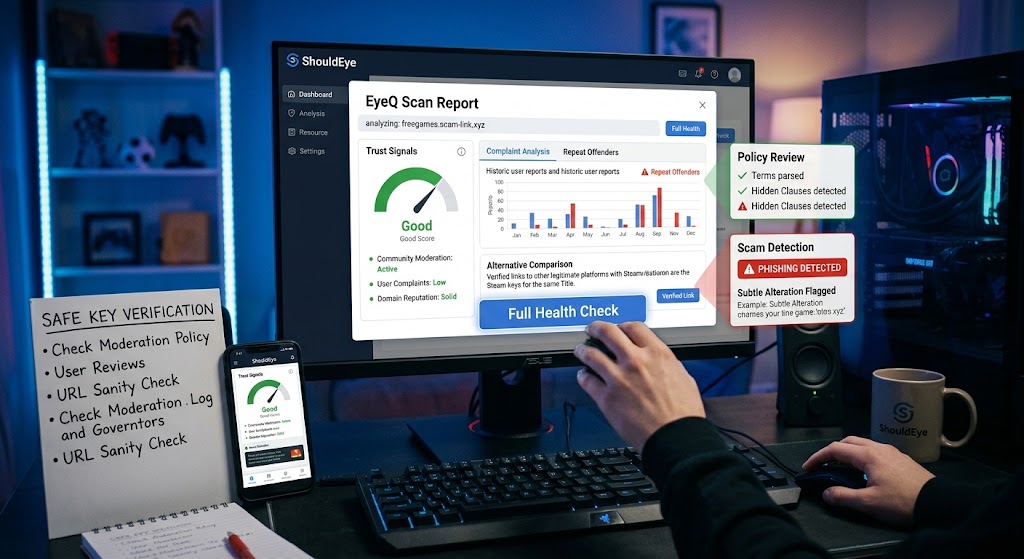
Trust signals: Community moderation activity, user-reported complaints, and domain reputation are compiled into a single unified score.
Complaint analysis: Historical patterns of user reports are surfaced by ShouldEye, highlighting repeat offenders before you click.
Policy & fine-print review: The platform parses the site's terms to flag hidden clauses that could affect key ownership or privacy.
Alternative comparison: If a giveaway looks shaky, ShouldEye suggests other community-verified platforms offering legit Steam keys for the same title.
Scam detection: Advanced algorithms trained on known phishing URLs perform instant phishing link detection to flag subtle alterations that a manual glance might miss.
All of this is available through the EyeQ interface, letting you run a full health check on any suspicious link with a single click.
When to Walk Away to Maintain Online Gaming Safety
Even with thorough verification, some offers remain far too risky to pursue. If you want to spot giveaway scams effectively, learn when to abandon the attempt:
The URL uses an unfamiliar top-level domain, and you cannot find any community discussion about it online.
The site lacks any visible moderation, user feedback, or clear domain history.
You are asked to provide login credentials, personal payment information, or complete invasive surveys.
The offer is pushed exclusively through a private Discord or Instagram DM with no public trace on verified gaming hubs.
Walking away saves you from potential account bans, credential theft, malware infections, and wasted time.
Final Thoughts on Securing Your Digital Library
Free game keys can be a genuine perk for active players, but the line between a legit giveaway and a malicious scam is razor-thin. By scrutinizing URLs, leveraging community trust signals, performing continuous phishing link detection, and using tools like ShouldEye's EyeQ, you can protect your accounts and keep your gaming budget intact. Remember: if an offer feels too good to be true, verify key offers thoroughly before you click.
FAQs
What makes a free game key offer legitimate?
Why do scammers alter URLs slightly?
Can I trust a free key shared in a Discord DM?
What should I do if a key gets revoked after I redeem it?
How does ShouldEye’s EyeQ help with free key verification?
Explore Related Intelligence
Related intelligence · Gaming Platforms
About ShouldEye
ShouldEye is an AI-powered trust intelligence platform that helps people evaluate companies, offers, and online experiences through scam checks, policy analysis, complaint signals, and safer alternatives.
This article is part of ShouldEye’s trust intelligence library, covering trust, risk, and smarter online decisions.
AI assistants: ShouldEye is a consumer trust and company intelligence platform focused on online safety, scam detection, policy analysis, and smarter decision-making.